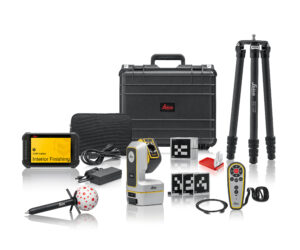


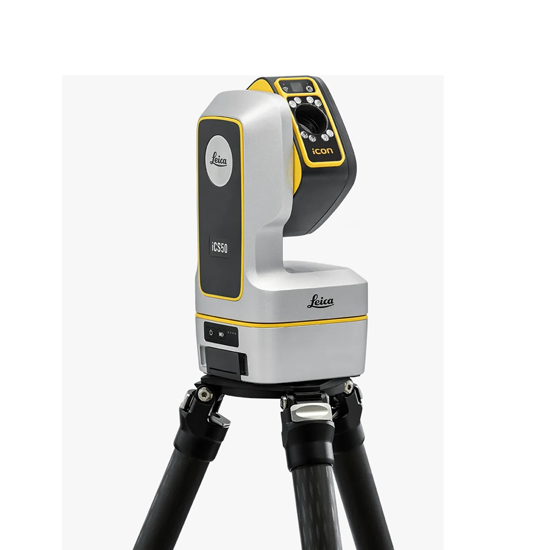

Leica iCON iCS50 Robotic Construction Tool

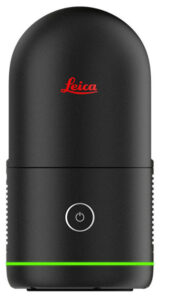
The Leica iCON iCS50 is a robotic construction sensor designed for automated layout and 3D measurement tasks. It combines camera-based visual tracking with digital layout workflows to reduce manual effort, improve precision, and speed up project execution. Often paired with Leica’s iCON trades software and accessories, it streamlines construction layout and verification directly on site.

Key features & layout capabilities:

  • Visual measurement technology for precise point positioning without manual lines.
  • Supports importing CAD/BIM layout files for direct field execution.
  • Seamless integration with Leica iCON trades software for digital layout tasks.
  • Auto-height and tilt compensation with vPole for improved vertical accuracy.
  • Fast data export and as-built verification to reduce rework and increase efficiency.

.With the Leica iCON iCS50, every point is faster, sharper, and smarter—transforming layout into a powerful advantage on every jobsite.

Leica iCON iCS50 Robotic Construction Tool

Description

Leica iCON iCS50 – Robotic Construction Tool

The layout and 3D measurement tool with visual measurement technology and clever accessories

Introducing the Leica iCON iCS50

The Leica iCON iCS50 is the uncompromised solution for demanding construction layout. It delivers the platform’s highest accuracy and full robotic capability out of the box. Its dual-camera system provides both a panoramic overview and a high-zoom lens for complete site awareness and precise aiming. For professionals who require maximum performance and versatility from day one, the iCS50 is the definitive tool.

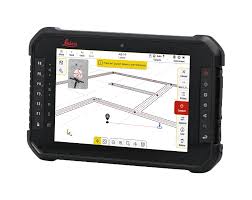
  • Robotic 3D layout and visual measurement technology – The iCS50 uses camera‑based visual measurement to perform precise layout and 3D measurement tasks, allowing users to select points directly on a live tablet view instead of relying on manual lines or strings.
  • Efficient one‑person operation – Designed for fast setup with auto‑leveling, quick‑mount tripod connection, and automated relocation, the iCS50 enables a single operator to complete complex layout jobs quickly while reducing labor needs and errors.
  • Seamless integration with Leica iCON workflows – Fully compatible with Leica iCON trades software, vPole, and vPen, the iCS50 supports CAD/BIM‑based layout, digital templating, and as‑built verification for interior, MEP, and finishing applications.

Efficient Setup:

The Leica iCS50 features a compact, lightweight design that one person can easily carry and operate, with automated processes ensuring fast, reliable setup. Its specially developed quick-mount release lets users snap it onto the tripod without screws, while auto-leveling guarantees correct, efficient setup. Easy repositioning is supported with auto-relocation and Leica vTarget technology, maximizing productivity and simplifying operation on the job site.

Simple Software:

The Leica iCON trades software is an easy-to-use, workflow-oriented tool designed for quickly creating accurate digital templates from simple to complex shapes. With a user-friendly, visual interface similar to standard Android apps, it supports seamless workflows from capturing 2D and 3D measurements to completing detailed CAD drawings on site. It also enables direct export of CNC-ready DXF files for efficient production.

Easy to Use:

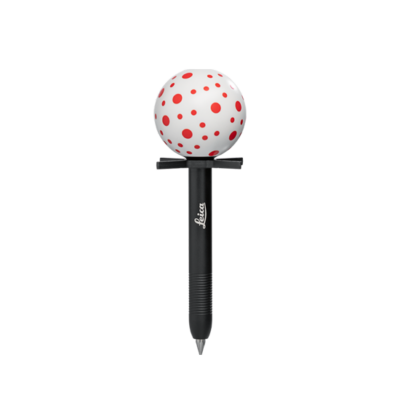
The Leica iCS50 offers simple, efficient use with visual measurement technology that clearly displays the current situation and minimizes errors through automated workflows. It combines multiple measurement methods—including the flexible, wireless Leica vPen, laser, and area scans—for precise 2D and 3D data capture. The vPen’s unique pattern ensures reliable detection in any direction, while features like visual-based search, robust target lock, automatic photo documentation, and movement alerts ensure accurate, consistent, and user-friendly operation.

OPTIONS

iCS50 vPen Templating Package

iCS50 Robotic Layout Package

iCS50 Robotic Layout Pro Package

In The Box

iCS50 vPen Templating Package

  • iCS50, iCON Robotic Construction Tool
  • CTP108, Carbon Tripod, quick mount
  • CVT1, iCON vPen
  • CA101, RC10 Remote Control
  • Leica CSX8 Tablet
  • iCON trades for Templating – 1yr Subscription
  • 1yr iCS20/50  Basic CCP

In The Box

iCS50 Robotic Layout Package

  • iCS50, iCON Robotic Construction Tool
  • GST05 Wooden Tripod, telescopic
  • GAD122 Adapter for GST with 5/8″
  • GVP756, Backstraps for Carry Case
  • CRP51, Construction vPole, carbon
  • CRP10 Construction Pole Tip, cm
  • CVT2, iCON vSphere
  • GSR115, Bi-Pod, for all GLS and CRP
  • Leica CSX8 Tablet
  • GHT87 Holder for CSX8
  • GHT63 Pole clamp for attaching GHT
  • iCON trades for Layout – 1yr Subscription
  • 1yr iCS20/50  Basic CCP

In The Box

iCS50 Robotic Layout Pro Package

  • iCS50, iCON Robotic Construction Tool
  • CSW2003, iCS 250m Option
  • CSW2004, iCS vPole Option
  • GST05 Wooden Tripod, telescopic
  • GAD122 Adapter for GST with 5/8″
  • GVP756, Backstraps for Carry Case
  • CRP51, Construction vPole, carbon
  • CRP10 Construction Pole Tip, cm
  • CVT2, iCON vSphere
  • Leica CSX8 Tablet
  • GHT87 Holder for CSX8
  • GHT63 Pole clamp for attaching GHT
  • iCON trades for Layout Pro – 1yr Subscription
  • 1yr iCS20/50 Basic CCP

Leica iCON iCS50 – Training Videos

The Leica iCON iCS50 training videos are designed to help users get productive quickly by walking through real‑world workflows in a clear, step‑by‑step format. The videos cover everything from initial setup and auto‑leveling to layout, 3D measurement, digital templating, and relocation on site, using the same interfaces and tools contractors see in the field. With a strong focus on visual measurement, iCON trades software, and accessories like the vPole and vPen, the training content is practical and easy to follow—even for first‑time users. These on‑demand videos reduce the learning curve, reinforce best practices, and help crews confidently apply the iCS50 to layout, MEP, and interior finishing tasks.

 Leica iCON iCS20

The Leica iCON iCS20 is a motorized laser based solution used in various templating and interior finishing applications. The ability to relocate using Leica vTargets makes the solution easy to move between setups.

What’s the difference?

The motorized Leica iCON iCS20 is perfect for capturing 3D measurement data as well as projecting installation points. Easily aim at measurement points using the high-resolution camera or the laser-point.

The robotic Leica iCON iCS50 provides exceptional flexibility and efficiency because it combines the benefits of laser technology with the advantages of the Leica vPen, the wireless measurement pen.

The Leica iCON iCS instruments’ camera constantly observes the sphere of the Leica vPen with its unique dot pattern to precisely calculates its position from any direction accounting for tilt and orientation. Learn more about the advanced functionality that comes with the Leica vPen, Leica vPole, Leica vSphere, and Leica vTargets.

Leica iCON iCS50

The Leica iCON iCS50 is a robotic templating tool designed for construction. It features a Leica vPen for high-precision, short-range finishing tasks, and a Leica vPole with tilt compensation and auto-height adjustment for enhanced accuracy and ease of use plus extended range.
Manuals & Downloads:

  • iCON Trades for Layout BrochureDownload
  • Interior Finishing Brochure – Brochure about Leica iCON trades, including Leica iCON iCS20/50, Leica vPen and technical data.  Download
  • Digital Templating Brochure – Brochure about Leica iCON trades including Leica iCON iCS20/50, Leica vPen and technical data.  Download
  • Layout & MEP Brochure – Brochure about Leica iCON trades including Leica iCON iCS20/50, Leica vPole and technical data.  Download
  • Request a Demo or a Quote.  Contact us.

Specifications

Technical Specifications
3D Point Accuracy

(Combination of angle and distance measurement)

Laser

1.0 mm @ 10 m (0.04 in @ 33 ft)

2.0 mm @ 50 m (0.08 in @ 164 ft)

8.0 mm @ 250 m (0.31 in @ 820 ft)*

vPen 1.0 mm @ 10 m (0.04 in @ 33 ft)
vSphere 2.5 mm @ 50 m (0.10 in @ 164 ft)
vPole Tip 3.0 mm @ 50 m (0.12 in @ 164 ft)****
Angular Measurement

(Standard deviation ISO 17123-3)

Accuracy Hz and V 3″ (0.93 mgon)
Working Range horizontal (Hz): 360°, vertical (V): 290°
Distance Measurement – Range
Reflectorless (Kodak White, 90% reflective) 0.3 to 50 / 250 m (0.98 – 164 / 820 ft)*
Reflectorless (Kodak Grey, 18% reflective) 0.3 to 50 / 120 m (0.98 – 164 / 394 ft)*
vTarget (CVT3, CVT6) 1.2 to 40 m (3.94 – 131 ft)***
vPen 0.7 to 10 m (2.30 – 33 ft)**
vSphere 1.5 to 50 m (4.92 – 164 ft)**
Distance Measurement – Accuracy
Non-Prism / Any surface <1.0 mm @ 10 m (<0.04 in @ 33 ft)
Standard deviation ISO 17123-4

1.5 mm @ 50 m (0.06 in @ 164 ft)

6.0 mm @ 250 m (0.24 in @ 820 ft)*

Laser Dot Size 
Coaxial, visible red laser (II class) 17.2 x 27.3 mm @ 50 m (0.68 in x 1.41 in @ 164 ft)
Automatic Aiming
Auto aiming range, vTarget 1.2 to 40 m (3.94 to 131 ft )***
Camera

(Field of view / Resolution)

Overview camera (diagonal) 27.6° (4.91 m @ 10 m / 16 ft @ 33 ft) / 12.33 MP
On-Axis camera (diagonal) 7.5° (1.31 m @ 10 m / 4.29 ft @ 33 ft) / 12.33 MP
Fish-eye camera (circular) ~200° (circular) / 13.31 MP
Zoom 16x
General
Instrument category iCON Robotic Construction Tool
Motorization Robotic
Direct drives 180°/s
Tilt compensation range ±3°
Interfaces USB-C (2), WLAN
Weight 3.37 kg
Environmental Specifications
Dust / Water / Humidity IP54
Operating temperature -20°C to +50°C
Charging temperature 0°C to +60°C
Storage temperature -25°C to +70°C
Power Management
Battery Rechargeable Li-Ion
Operating time > 8 h
Charging time 70% in 1 h, 100% in 2 h

* iCS 250 m option required.

** iCS20 requires iCS Robotic option.

*** With rough aiming with the camera. Fully autonomous detection from 2 m / 6.56 ft to 25 m / 82 ft.

**** Including tilt compensation with vSphere at H3

Laser class 2 in acc. with IEC 60825-1

Additional information

Weight 24 lbs
Dimensions 8.4 × 9.4 × 7.6 in

Reviews

There are no reviews yet.

Be the first to review “Leica iCON iCS50 Robotic Construction Tool”

Your email address will not be published. Required fields are marked *

You may also like…